Murf vs. ElevenLabs for Course Creators (2026): LMS Voiceover Without Re-Recording
For slide-heavy LMS modules, PowerPoint/Slides courses, and business-licensed training narration, start with Murf.ai. For natural-sounding lesson VO, cheap commercial entry, cloning your own teaching voice, or dubbing modules into other languages, start with ElevenLabs. Do not buy both on day one — pick the workflow your LMS already uses.
What we checked ourselves
Our ElevenLabs test, Oct 30, 2026 CT
We ran one 604-character YouTube-intro script through our paid ElevenLabs Starter account: three premade voices on the default eleven_v4 model, plus one take on Flash (eleven_flash_v2_5). One take each, default settings, no editing.
- 4 takes of a 604-character script, 604 credits each (2,416 credits in total). That is 1 credit per character.
- About 955 credits per finished minute across all 4 takes (2,416 credits for 151.7 seconds of audio).
- About $0.19 per finished minute on Starter monthly ($6), or about $0.16 on Starter billed yearly ($5/mo). A 30k-credit Starter month covers roughly 31 finished minutes of narration like this.
- Flash charged the same credits but generated about 3x faster (about 2.9 s versus 10–11 s). We saw no Flash discount, so budget Flash at the same credits per character.
Full table, audio sample, and limits on our ElevenLabs pricing page.
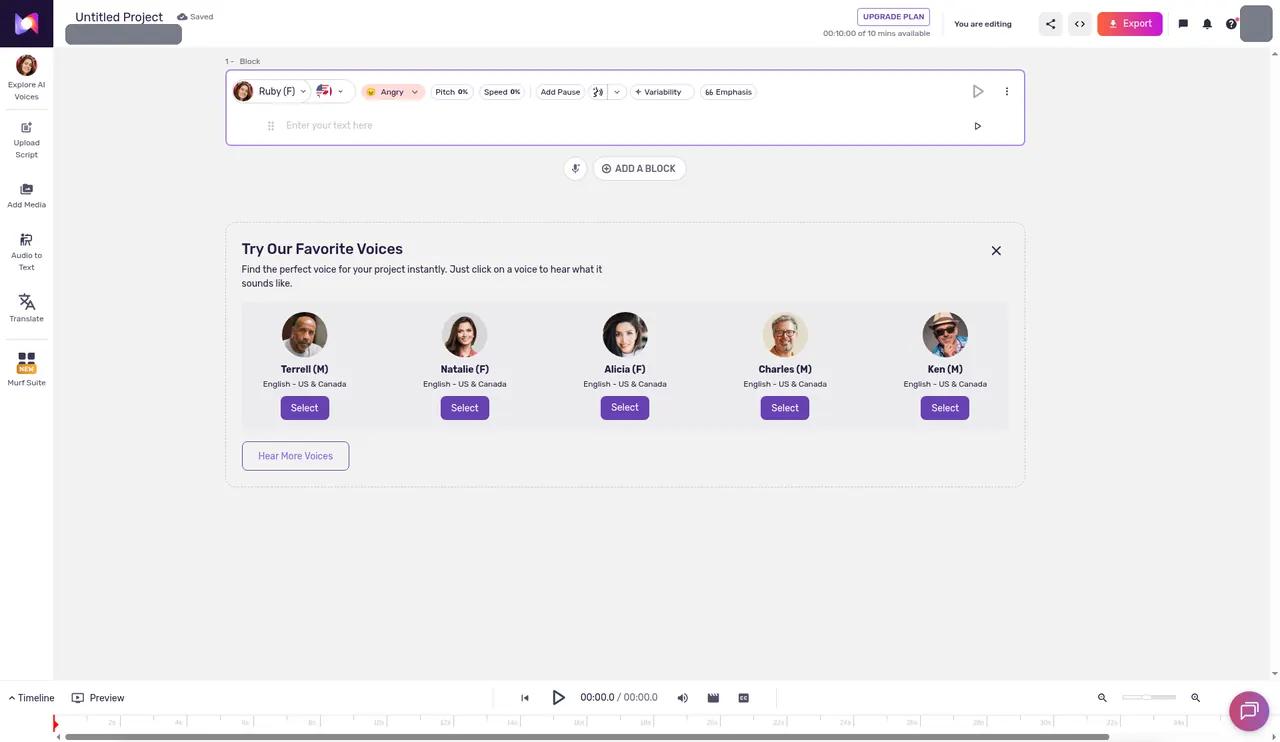
Real screenshots from our own free accounts, opened Oct 27, 2026 CT with no card. They show the plan and allowance each account started with. We have not run a full project through these tools yet, so we do not rate output quality here.
Workflow steps
The steps in order. Course / LMS voiceover pipeline.
- Lesson script for the module
- Generate VO (Murf team vs ElevenLabs solo)
- Export into LMS / slide deck
- Optional: Avatar presenter for no-camera lessons
Our general ElevenLabs vs. Murf.ai comparison covers the broad creator-vs-presentation fork. Course creators have a narrower job: dozens of lesson scripts, consistent pronunciation of product and industry terms, updates without booking another studio day, and sometimes multi-language cohorts. That is a capability question — voice for courses without re-recording — with a money answer: one of two voice tools. For cloning ethics and consent, pair this page with AI voice cloning for creators. For how voice sits next to clipping and avatars, see the Best AI Video & Voice Stack (2026).
What course creators actually need from AI voice
- Batch lesson narration — generate module 1–12 from a maintained script deck, not one-off clips.
- Pronunciation control — product names, acronyms, and learner-facing terms that must sound the same every week.
- LMS / slide handoff — export that lands in PowerPoint, Google Slides, SCORM wrappers, or video hosts without a film crew.
- Consent-safe cloning — your voice or a hired narrator with written permission; never a third party without rights.
- Update velocity — rewrite three paragraphs in lesson 7 and regenerate VO without rebooking talent.
If you only need a 30-second YouTube cold open, the general comparison is enough. If you ship a catalog, stay on this page.
Pricing for course budgets (published snapshots)
Figures are published-plan snapshots aligned with ATI comps as of Aug–Sep 2026. Confirm current vendor pricing before you subscribe.
| Plan | ElevenLabs | Murf.ai |
|---|---|---|
| Free / trial shape | 10,000 credits/mo free tier | 10 projects, 10 min/mo, no commercial rights |
| Entry commercial | Starter — $6/mo, commercial rights, instant voice cloning | Creator — ~$19/mo, commercial rights, 100 projects, 24 hrs/year generation |
| Team / training | Higher tiers scale credits + pro cloning | Business — ~$66/mo, business license, PPT / Slides / Canva integrations |
| Course fit | Realism, clone-your-voice, multilingual dubs | LMS slides, corporate licensing, batch presentation VO |
When Murf.ai wins for courses
- Office-tool native workflows. If lessons live in PowerPoint or Google Slides (or you decorate decks in Canva), Murf's integrations reduce “export audio → hunt for the right slide” friction.
- Business licensing. Creator and Business tiers are oriented at commercial and business use — useful when an L&D or compliance buyer asks what license covers the catalog.
- Presentation-first pacing. Training narration often sits under bullet slides, not cinematic YouTube takes. Murf's product surface matches that job.
- Team / project ceilings. Higher project counts suit ongoing content ops refreshing a full cohort each quarter.
When ElevenLabs wins for courses
- Voice realism as a selling point. If learners bounce on “robot teacher” vibes, ElevenLabs remains the benchmark most creator ears compare against.
- Cheapest serious commercial entry. Starter at $6/mo is the low-friction way to narrate a first cohort before you justify Murf Business.
- Clone your teaching voice (with consent). Instant cloning on entry paid tiers fits solo instructors who want continuity without booking a booth for every update. Details and ethics: voice cloning for creators.
- Dubbing / localization. Shipping the same module in Spanish, Portuguese, or other languages is closer to ElevenLabs' dubbing strengths than Murf's office-tool focus.
Practical LMS / course workflow
- Write lesson scripts in a shared doc with a pronunciation glossary (product names, acronyms).
- Pick one primary voice tool — Murf for slide decks, ElevenLabs for video-first or cloned instructor VO.
- Generate module audio in batches; keep filenames aligned to lesson IDs (
m03-l02.mp3). - Drop audio into your LMS, slide deck, or video host. If you also need avatar presenters for compliance modules, see AI avatar tools for training (Synthesia-led).
- When a lesson changes, edit the script first, regenerate only that lesson, and replace the asset — that is the whole point of AI VO for courses.
Consent and course-catalog ethics (short version)
Clone only voices you own or have written permission to use. Disclose synthetic narration when your LMS policy, employer, or student contract requires it. Do not clone celebrity or competitor voices “for engagement.” Full treatment lives on the voice cloning guide; this page assumes you already cleared rights.
Decision forks (course-specific)
| Your situation | Pick | Why |
|---|---|---|
| Lessons are mostly PPT / Slides inside an LMS | Murf | Integrations + business licensing |
| Video-first Teachable / YouTube course; want natural VO | ElevenLabs | Realism + $6 Starter |
| Need to sound like you without re-recording | ElevenLabs | Cloning on commercial entry |
| Corporate L&D buyer needs contract-friendly license | Murf Business | Business license orientation |
| Same course in multiple languages | ElevenLabs | Dubbing / localization strength |
| Avatar on-screen teacher + custom VO | Synthesia + Murf or ElevenLabs | See avatar training + voice stack guides |
What not to buy for course VO
- Both Murf and ElevenLabs on day one. One narrator stack until a named gap appears.
- An avatar suite “just because.” Voiceover on slides is often enough; avatars are a separate training job — when not to buy AI video tools.
- Jasper / Copy.ai / Surfer as a voice substitute. Writing suites do not narrate LMS modules.
- Unlicensed voice clones. Capability without consent is a liability, not a growth hack.
Final recommendation
Default for slide / LMS / corporate training catalogs → Murf.ai. Default for video-first creator courses, cloned instructor voice, or multilingual modules → ElevenLabs. Revisit the general ElevenLabs vs. Murf page only if you are still deciding outside the course job. Wire the winner into your wider stack with the 2026 video & voice stack.
See Murf.ai's plans See ElevenLabs' plansRelated guides
- ElevenLabs vs. Murf.ai — general creator vs presentation fork
- Best AI Video & Voice Stack (2026) — Budget / Creator / Agency paths
- AI voice cloning for creators — consent, use cases, limits
- Best AI avatar tools for training (2026) — Synthesia-led L&D
- Best AI tools for course creators (2026) — pick by lesson format, with totals
A note on how we put this together
This page deepens the course/LMS angle beyond the general ElevenLabs vs Murf comparison. Pricing references align with published-plan snapshots on ATI voice pages (Aug–Sep 2026). Confirm current vendor pricing before you subscribe.
Frequently asked questions
Is Murf or ElevenLabs better for online course voiceover?
Murf.ai usually fits LMS and slide-heavy courses better — PowerPoint, Google Slides, and Canva integrations plus business licensing on Creator/Business. ElevenLabs wins when lesson realism, cheap commercial entry ($6/mo Starter), or dubbing modules into other languages matter more than office-tool workflows.
Can I clone my own voice for course lessons?
Yes on both platforms within their published cloning features — but only with clear consent for every voice you clone, including your own talent contracts. For ethics, consent, and creator vs training forks, see our AI voice cloning for creators guide.
How much do Murf and ElevenLabs cost for course creators?
Published-plan snapshots on ATI (Aug–Sep 2026): ElevenLabs Starter $6/mo with commercial usage rights; Murf Creator ~$19/mo and Business ~$66/mo with office integrations and business licensing. Confirm current vendor pricing before you buy.
Should course creators buy both Murf and ElevenLabs?
Usually no. Pick one primary narrator stack for the course catalog. Add a second tool only when a concrete gap appears — e.g. Murf for slides plus ElevenLabs for a multilingual dub of a flagship module.
How is this different from the general ElevenLabs vs Murf comparison?
The general ElevenLabs vs Murf page covers creator vs presentation buyers broadly. This page narrows to course creators, LMS narration, batch lessons, pronunciation, and training consent — the jobs that show up when you ship modules, not short social clips.