Descript vs. Synthesia (2026): Film Yourself or Script-to-Avatar?
Pick Descript when you already film (or should) and need to edit audio/video by editing a transcript. Pick Synthesia when there is no camera day and the job is a scripted explainer, training module, or multi-language presenter. Hybrid later is fine — buying both on day one usually is not.
What we checked ourselves
- Descript: The transcript pane is the real editor — Descript says cutting “um” and dead air works by deleting text instead of scrubbing a timeline. Overdub and export sit beside the preview, which matches Path A (film yourself) on this page.
- Synthesia: The default loop is script → avatar / language → generate. There is no camera day in the core flow; presenter choice and multi-language sit next to the script, which is why Path B is a different seat — not a Descript rival.
- Honest limit: The Descript screenshot is our own free account; we have not run a Synthesia account. Pricing remains published-plan snapshots — verify on each vendor before you buy.
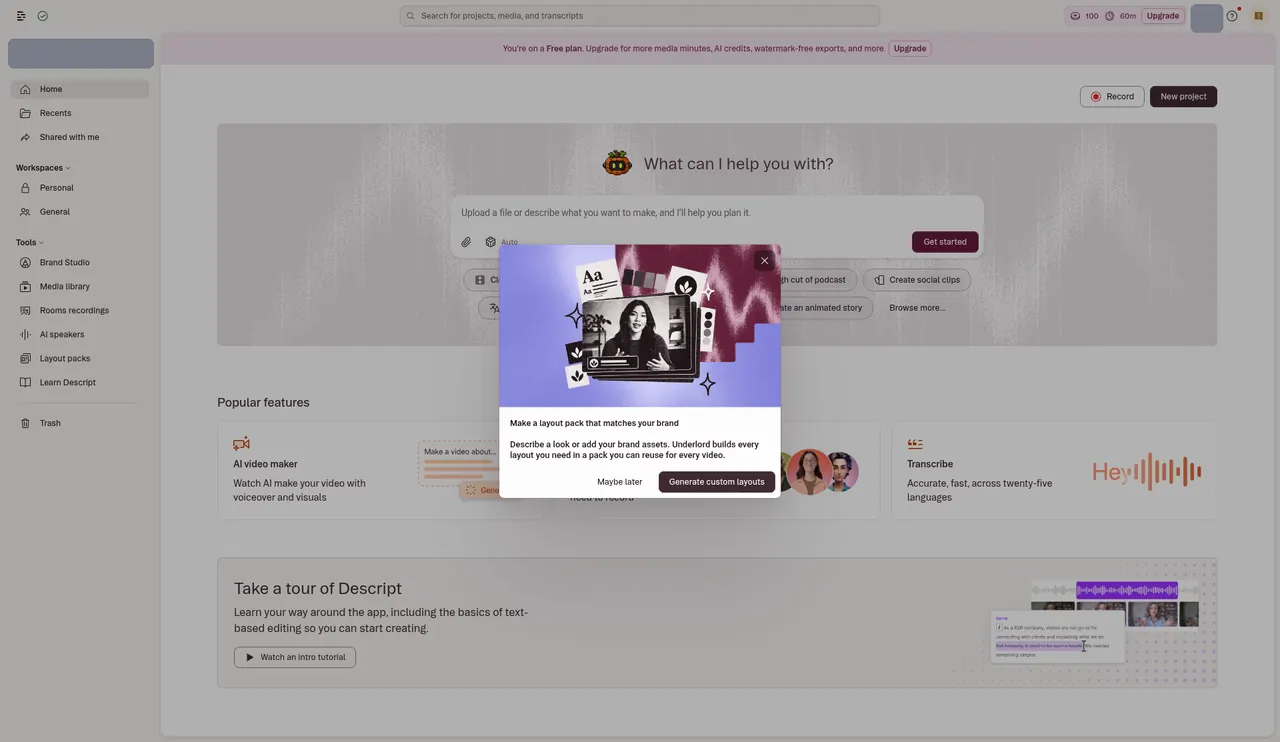
Real screenshots from our own free accounts, opened Oct 27, 2026 CT with no card. They show the plan and allowance each account started with. We have not run a full project through these tools yet, so we do not rate output quality here.
Descript and Synthesia both show up in “AI video” roundups, but they solve opposite starting conditions. Descript assumes you recorded something. Synthesia assumes you wrote something. Treating them as rivals for the same seat is how creators overspend. This comparison forces a primary-path choice, then points to when a hybrid makes sense. For the broader Budget / Creator / Agency map, see the AI video & voice stack guide. For when avatars beat filming in more detail, see AI avatar video explainers.
The real difference in one sentence
Descript = text-based editing of real footage and audio. Synthesia = script-to-avatar generation with no filming required for the core deliverable.
| Dimension | Descript | Synthesia |
|---|---|---|
| Starting input | Recorded podcast / talking-head / interview | Written script (+ avatar) |
| Core magic | Edit media by editing transcript; filler removal, overdubs | Generate a presenter delivering the script |
| Authenticity | Your face and voice (unless you overdub) | Stock or custom AI avatar |
| Best jobs | YouTube, podcasts, interviews, hybrid film+edit | Training, product explainers, localization |
| Does not replace | Purpose-built long→short clipping (Opus Clip / Vizard) | Personality-led creator channels |
Path A — Film yourself: Descript
If subscribers follow you, stay on camera. Descript's transcript editing removes the worst part of production: scrubbing a timeline to cut “um,” dead air, and false starts. The free plan caps at about 60 minutes of media/mo — enough to pressure-test the workflow before you pay.
Published plans (Aug–Sep 2026 ATI comps): Hobbyist ~$16/mo annually (watermark removed, voice cloning); Creator ~$24/mo annually with 4K export and a larger AI credit allowance; Business roughly $50–65/mo for more media hours and seats. Confirm on Descript's pricing page before you buy.
Keep Descript when you still own the master recording and need clean long-form output. If your only job is cutting social clips from finished episodes, you may want a clipping tool instead — see Descript vs. Opus Clip and the long → Shorts workflow.
See Descript's plansPath B — No camera: Synthesia
Synthesia starts from a written script and generates an AI presenter — no lighting, wardrobe, or reshoot when the product UI changes. That is the right tool when camera time (or bilingual talent) is the bottleneck, not when you are trying to look more “authentic” on a personal brand channel.
Checked Oct 26, 2026 CT on synthesia.io/pricing: free Basic plan 10 minutes/mo (watermarked, limited avatars); Starter $14/mo billed yearly ($19 monthly), up to ~12 extra minutes a month; Pro $59/mo billed yearly ($89 monthly), up to ~60 extra minutes. Pro replaced the old Creator plan. All prices on our price tracker.
Use Synthesia for product explainers, internal training, compliance walkthroughs, and multi-language versions of the same message. Deeper capability framing: when AI avatars beat filming.
See Synthesia's plansDecision rules (pick one primary path)
- Audience follows your face → Descript (film + edit).
- Message > messenger; no studio time → Synthesia.
- Same explainer in 3+ languages → Synthesia first; film only a short trust intro if needed.
- Weekly podcast / YouTube personality → Descript; add clipping tools for Shorts, not avatars.
- Unsure → try both free tiers on one real script / one real recording this week, then pay for the path you actually finished.
When a hybrid is worth it
A pattern that works for SaaS and course creators without pretending avatars replace personality:
- Film a 20–40 second personal intro (trust).
- Clean that clip in Descript.
- Generate the dense mid-section in Synthesia from a maintained script.
- Ship social teasers from real long-form footage with Opus Clip or Vizard — not from the avatar master unless that is your only asset.
Buy the second tool only after the first path is shipping weekly. Most teams that fail with “AI video” bought the hybrid before they had a primary.
What not to confuse this with
- Clipping tools. Opus Clip and Vizard do not replace Descript or Synthesia; they sit after long-form exists. See Opus Clip vs. Vizard.
- Voice-only tools. ElevenLabs / Murf are narration layers — useful with either path, required by neither for a first test.
- “More authentic avatars.” If authenticity is the product, film. Avatars win on consistency and localization, not intimacy.
Ballpark cost snapshots
Figures are published-plan snapshots aligned with ATI comparisons as of Oct 26, 2026. Confirm current vendor pricing before you subscribe.
| Path | Tools | Ballpark / mo | Best for |
|---|---|---|---|
| Film trial | Descript free → Hobbyist/Creator | $0 → ~$16–$24 annual | Podcast / YouTube editors |
| Avatar trial | Synthesia free → Starter | $0 → $14 billed yearly | Judging avatar quality on real scripts |
| Creator film path | Descript Creator | ~$24 annual | Regular recorded long-form |
| Explainer / training | Synthesia Starter or Pro | $14–$59 billed yearly | Scripted modules, localization |
| Hybrid (later) | Descript Creator + Synthesia Starter | ~$38 | Personal hook + scripted body |
Need a custom mix? Try the cost calculator or the Find My Tool quiz.
Final recommendation
Choose the path that matches this week's bottleneck:
- You already record (or your brand needs your face) → Descript
- Camera time / language coverage is the constraint → Synthesia
- You need both deliverable types weekly → Descript primary + Synthesia secondary, not twin day-one seats
Most personality-led creators should never “switch to avatars.” Most training/explainer teams should not force founders on camera for every module.
Descript SynthesiaRelated comparisons
- AI Avatar Video Explainers (2026) — when avatars beat filming
- Best AI Video & Voice Stack (2026) — Budget / Creator / Agency paths
- Descript vs. Opus Clip — full editor or purpose-built clipping?
- Long video → Shorts workflow — after you have real footage
A note on how we put this together
Pricing and plan details above are drawn from each vendor's published pricing pages and cross-checked against our existing ATI comparisons (video & voice stack, avatar explainers, Descript vs. Opus Clip). We are not claiming a fresh multi-week bake-off of every feature — treat the capability framing and published-plan math as the reliable part, and confirm current vendor pricing before you subscribe. Promo rates (especially Synthesia) move often.
Frequently asked questions
Is Descript or Synthesia better for YouTube creators?
If your audience follows you as a person, Descript wins — you still film, then edit by editing a transcript. Synthesia wins when the message matters more than your face: product explainers, training modules, and multi-language versions of the same script. Personality channels should not default to avatars.
Can I use Descript and Synthesia together?
Yes as a hybrid later — film a short personal hook in Descript, then generate the dense mid-section in Synthesia. Do not buy both on day one unless you already know you need both deliverable types weekly. Pick a primary path first.
How do Descript and Synthesia pricing compare?
Published-plan snapshots on ATI (Aug–Sep 2026): Descript free (60 min/mo) → Hobbyist ~$16/mo annual → Creator ~$24/mo annual; Synthesia free (10 min/mo) → Starter $14/mo billed yearly ($19 monthly) → Pro $59/mo billed yearly ($89 monthly), Synthesia prices checked Oct 26, 2026. Entry paid tiers are similar; Synthesia Pro jumps higher for heavier avatar production. Confirm current vendor pricing before you buy.
Does Synthesia replace Opus Clip or Vizard?
No. Clipping tools assume source footage and turn long-form into Shorts/Reels/TikTok. Synthesia assumes a script and generates a presenter. If your bottleneck is long→short, see our long-video-to-shorts workflow — not this comparison.
When should I skip both and just film raw?
If you publish infrequently and do not mind timeline editing, a free editor may be enough. Buy Descript when filler removal and transcript editing are eating hours; buy Synthesia when camera days are the constraint. Neither tool fixes an empty content calendar.